
Beta / Tool reference
Sattari Stem Separator: Formats, Privacy & Limits
Extract vocals, drums, bass and other instruments from one track or a batch, with estimated song and stem keys, tempo, prominent notes and audio levels.
Open Sattari Stem Separator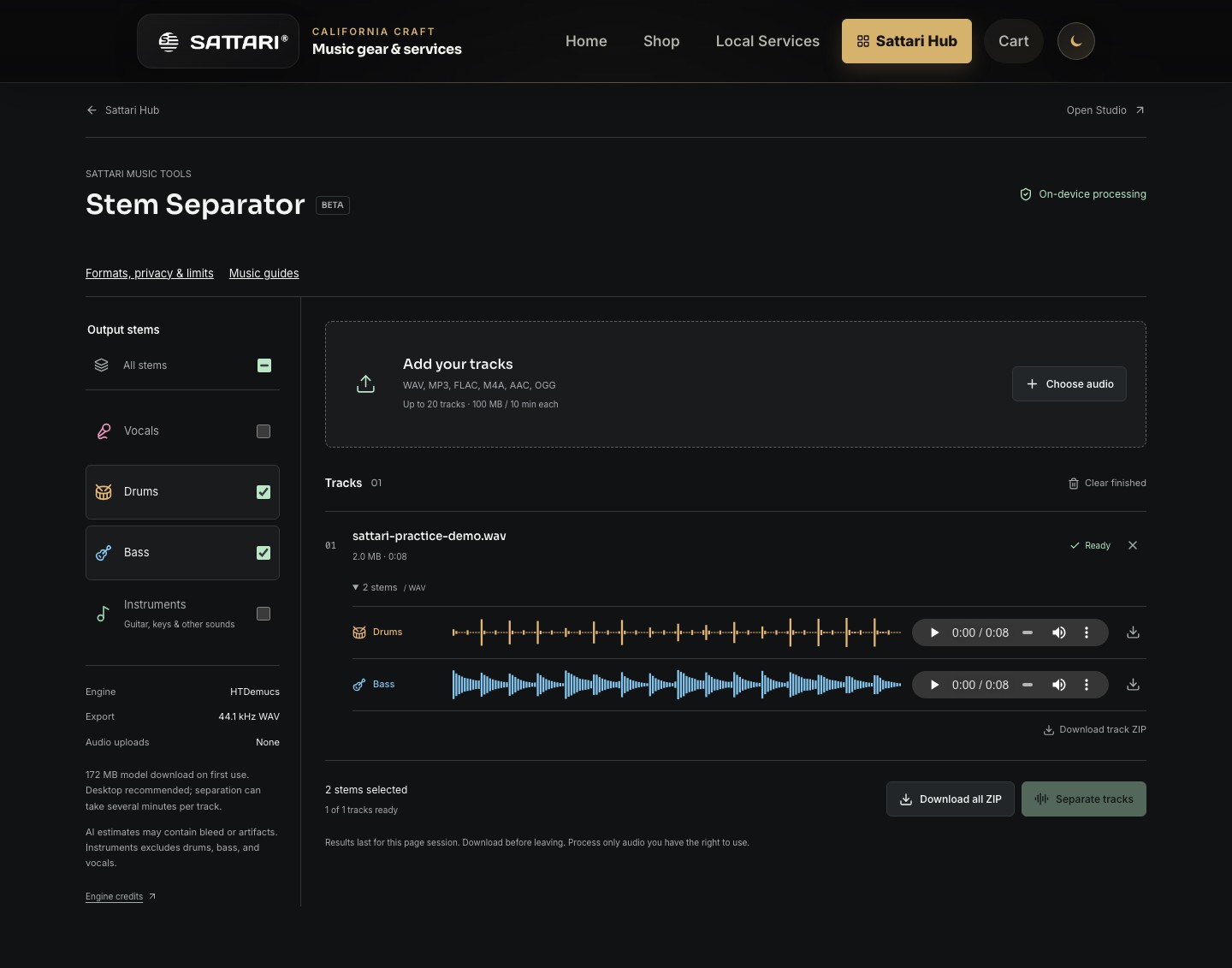
- Input
- WAV, MP3, FLAC, M4A, AAC and OGG when the browser can decode the codec. Mono or stereo files only; no streaming links or DRM-protected audio.
- Output
- 44.1 kHz, 32-bit float stereo WAV. Individual stems, per-track ZIP and batch ZIP. Instruments is the other source, excluding vocals, drums and bass.
- Musical analysis
- On-device Sattari AutoKey and pulse estimates for the song and selected stems, prominent pitch classes, duration, sample peak and RMS levels. Download an analysis JSON report separately or in the ZIP. AutoKey and levels cover the full audio; note summaries, tonal-evidence checks and tempo sample up to three 20-second sections.
- Limits
- 20 tracks; 100 MiB per file; 300 MiB total source files; 10 minutes per track; 512 MiB of retained outputs. The queue processes sequentially.
- Browser
- Requires JavaScript, Web Audio, Web Workers and WebAssembly. Desktop recommended. WebGPU is attempted with CPU fallback during initialization; acceleration and speed depend on hardware.
- Privacy
- Source audio is not uploaded. An approximately 172 MiB model is downloaded from Hugging Face on first use and cached when available. The model host receives a normal download request, not your song.
- Price
- The current browser tool is free to use, with no sign-in or payment step. Your own internet and device costs still apply.
- Storage
- Results are temporary for this page session. Download before leaving or reloading. Model caching does not save your finished stems.
- Limitations
- AI estimates may contain bleed and artifacts. All four sources are computed even when fewer outputs are selected. This is not recovery of the original studio multitracks. Musical analysis is approximate, not a transcription: sparse stems, relative keys, tempo changes and half/double-time pulses can be ambiguous. No key is assigned to drums; weak estimates may remain undetermined.
Try the same audio
An original eight-second synthesized A minor groove at 120 BPM: bass, chords and percussion, with no vocals. Free to download and use for practice. This is a workflow demonstration, not a commercial-song benchmark.
Download demo WAV- Download the original eight-second demo below.
- Add it to Stem Separator and choose Bass and Drums, or all four stems.
- Run separation and compare the returned parts with the original. This synthetic sample tests the workflow, not vocal-isolation quality.
Your browser and your files
Start with a short file and verify a small export before a long session. Browser storage is not a backup. No all-device performance guarantee is implied by these screenshots.
Audio privacy and measurement choicesWhat would you like to isolate or remove?
A stem splitter separates a finished mix into estimated source groups. Choose an isolated part to study, or combine the remaining parts into a musician practice track. Download the WAV stems, align their starts in Studio or another audio editor, check the combined level and export there. A separator ZIP contains individual files; it does not create a mixed backing track. Bleed and separation artifacts can remain.
Vocal isolation / acapella
Keep: Vocals. Hear singing phrasing; lead and backing vocals can remain together.
Follow the vocal isolation / acapella workflowVocal remover / karaoke backing track
Keep: Drums + Bass + Instruments. Combine the three non-vocal stems for singing practice.
Follow the vocal remover / karaoke backing track workflowDrum isolation
Keep: Drums. Study grooves and fills; this is a combined drum estimate, not separate kit microphones.
Follow the drum isolation workflowDrum remover / drumless backing track
Keep: Vocals + Bass + Instruments. Combine the remaining parts and play your own drum part.
Follow the drum remover / drumless backing track workflowBass isolation
Keep: Bass. Hear the bass line as a reference for learning by ear.
Follow the bass isolation workflowBass remover / bassless backing track
Keep: Vocals + Drums + Instruments. Combine the remaining parts and rehearse your own bass line.
Follow the bass remover / bassless backing track workflowInstruments is the remaining source group, often including guitar and keys; it is not the complete instrumental mix. The original demo below contains no singing, so it demonstrates bass/drum separation rather than vocal-removal quality.
Hear the actual separated results
An original eight-second synthesized groove in A minor at 120 BPM, with no vocals. The bass and drums below are unedited HTDemucs estimates, not the clean synthesis sources. Listen for leakage, the start of each note and how long it rings out. This short example demonstrates the workflow, not the quality you can expect from every song.
Bass estimate
Download bass estimate WAVDrum estimate
Download drum estimate WAVCount four steady beats, then try matching the bass note lengths. Import these WAVs into Sattari Studio to hear them together, or separate your own recording.
Stem Separator questions
How do I remove drums or bass from a song?
Separate all four stems and keep the part you want to remove as a reference. For a drumless track, combine Vocals, Bass and Instruments. For a bassless track, combine Vocals, Drums and Instruments. Align the WAV files in Studio or another audio editor and export the combined mix. The separator ZIP itself is not a mixed backing track; some removed sound may still leak into the other stems.
Is a stem splitter the same as a vocal remover?
A stem splitter estimates several source groups from a finished mix. Vocal removal is one use: leave out the Vocals estimate and combine the other three stems. Vocal isolation does the reverse and keeps Vocals. Neither operation guarantees a perfectly clean result or recovers the original recording session.
Is Sattari Stem Separator free, with no sign-up?
The current browser tool is free and does not require an account or app installation. Your device supplies the processing power. The first run downloads an approximately 172 MiB model, and browser, memory and queue limits still apply.
Does Instruments mean a complete instrumental backing track?
No. Instruments is the remaining source group, including sounds such as guitar and keys. For a non-vocal backing track, combine Drums, Bass and Instruments with aligned starts. A ZIP contains separate stems, not an automatically mixed instrumental.
Can I isolate guitar, piano, kick or snare separately?
Not with the current four-source model. Guitar and piano generally share Instruments; kick, snare and cymbals share Drums. Vocals can include both lead and backing singers. Separation estimates can contain leakage between groups.
Can I paste a YouTube, Spotify or other streaming link?
No. Add an audio file that you own or have permission to process. Streaming links and protected downloads are not supported. A supported extension does not guarantee that your browser can decode the codec inside the file.
Why do the song and its stems show different key or BPM estimates?
Individual parts contain less context. Sparse notes, relative major/minor ambiguity and half-time or double-time pulses can change the estimate. Sattari AutoKey scans the whole stem; tempo samples up to three 20-second windows. Neither is a full transcription or section map. Drum stems are not assigned a key.
Are my songs uploaded or my stems saved automatically?
Source audio is processed on your device, not uploaded for separation. Loading the site and downloading its model still use the network. Results last only for the current page session: download your WAVs, ZIPs and analysis report before leaving or reloading.